Showing posts with label Blogger. Show all posts

Controller Blogger Template

Controller Blogger Template


Name:Controller
Platform:Blogger / Blogspot
Coder/Designer:xml blogger templates
Coder/Designer URL:http://www.xmlbloggertemplates.com/
Description:Controller is a free Blogger template that is nice magazine style Blogger
template. With 2 column, 1 right sidebar, 3 column footer, page navigation, banner ads ready and more. This template designed for all type of blogs.
Theme Features:-
Instructions:-
Compatible:Mozilla FirefoxGoogle ChromeSafariOperaInternet Explorer
Tags:1 Sidebar, 2 Column, 3 column footer, Ads Ready, black, Blogger, Blue, Fixed Width, Magazine, Page Navigation, Related Posts, Right Sidebar, Social Bookmark, Twitter Ready, White, Widget Ready

Box Office Blogger Template

Box Office Blogger Template


Name:Box Office
Platform:Blogger / Blogspot
Coder/Designer:Avinas Bhardwaj, Web 2 Feel
Coder/Designer URL:http://besttheme.net/ , http://www.web2feel.com/
Description:Box Office is a free Blogger template that is an adaptation of the Wordpress.
This is a movie review template which is intent for use in any review like movie, video, book, software etc. This theme have a nice rating bar which will represent the rating given by author.
Theme Features:-
Instructions:-
Compatible:Mozilla FirefoxGoogle ChromeSafariOperaInternet Explorer
Tags:1 Sidebar, 2 Column, 4 Column, Adapted from Wordpress, Blogger, brown, Fixed Width, Gallery, Pink, red, Right Sidebar, White

Inspect Blogger Template

Inspect Blogger Template


Name:Inspect
Platform:Blogger / Blogspot
Coder/Designer:Lasantha Bandara / New WP Themes
Coder/Designer URL:http://www.premiumbloggertemplates.com/ , http://newwpthemes.com/
Description:Inspect is a free Blogger template that is an adaptation of the Wordpress,
it's a elegant magazine style with 1 sidebar, 2 column layout, blue and red color background, featured section, fixed width, header banner ads ready, right sidebar, slider, Twitter ready, top navigation bar and Web 2.0.
Theme Features:-
Instructions:Configure Featured Content Slider:
Login to your blogger dashboard--> layout- -> Edit HTML. Find <!-- Featured Content Slider Started -->. Now scroll down slowly and you can see each featured slider codes between <div class='imageElement'> and </div>.

Now replace,
"This is featured post X title" with your featured post title.
"SLIDER-X-URL-HERE" with your featured post URL.
Slider description with your slider description. Slider image address with your slider image. For each featured slider.

Add a Header Logo:
You can add a header logo for this template easily in the "Page Elements" section (Blogger Default Method). Logo image size must be 239px width and 92px height.
Compatible:Mozilla FirefoxGoogle ChromeSafariOperaInternet Explorer
Tags:1 Sidebar, 2 Column, Adapted from Wordpress, Ads Ready, Blue, Blogger, dark, Elegant, Featured Section, Fixed Width, Magazine, red, Right Sidebar, Slider, Social Bookmark, Twitter Ready, Web 2.0, Widget Ready

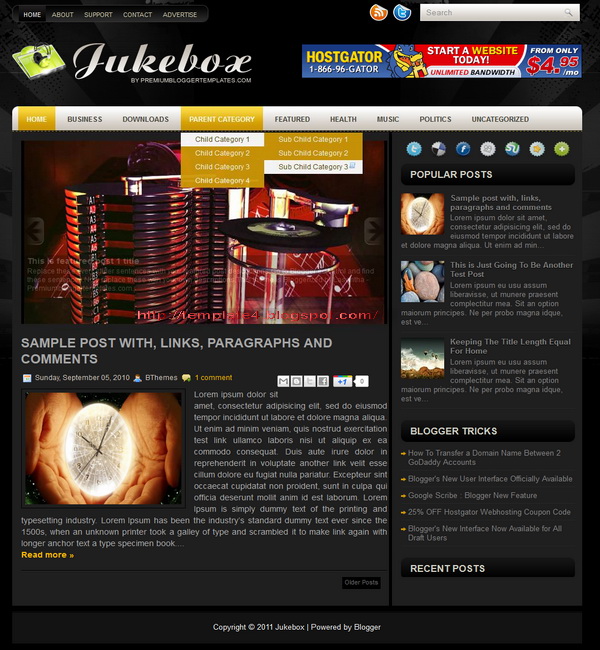
Jukebox Blogger Template

Jukebox Blogger Template


Name:Jukebox
Platform:Blogger / Blogspot
Coder/Designer:Lasantha Bandara / New WP Themes
Coder/Designer URL:http://www.premiumbloggertemplates.com/ , http://newwpthemes.com/
Description:Jukebox is a free Blogger template that is an adaptation of the Wordpress,
it's a magazine style with 1 sidebar, 2 column layout, black, yellow and white color background, featured section, fixed width, header banner ads ready, right sidebar, rounded corners, slider, Twitter ready, top navigation bar and Web 2.0.
Theme Features:-
Instructions:Configure Featured Content Slider:
Login to your blogger dashboard--> layout- -> Edit HTML. Find <!-- Featured Content Slider Started -->. Now scroll down slowly and you can see each featured slider codes between <div class='imageElement'> and </div>.

Now replace,
"This is featured post X title" with your featured post title.
"SLIDER-X-URL-HERE" with your featured post URL.
Slider description with your slider description. Slider image address with your slider image. For each featured slider.

Add a Header Logo:
You can add a header logo for this template easily in the "Page Elements" section (Blogger Default Method). Logo image size must be 400px width and 74px height.
Compatible:Mozilla FirefoxGoogle ChromeSafariOperaInternet Explorer
Tags:1 Sidebar, 2 Column, Adapted from Wordpress, Ads Ready, black, Blogger, dark, Featured Section, Fixed Width, Magazine, Right Sidebar, Slider, Social Bookmark, Twitter Ready, Web 2.0, White, Widget Ready, Yellow

iFashion Blogger Template

iFashion Blogger Template


Name:iFashion
Platform:Blogger / Blogspot
Coder/Designer:Lasantha Bandara / New WP Themes
Coder/Designer URL:http://www.premiumbloggertemplates.com/ , http://newwpthemes.com/
Description:iFashion is a free Blogger template that is an adaptation of the Wordpress,
it's a magazine style with 1 sidebar, 2 column layout, red and white color background, featured section, fixed width, header banner ads ready, right sidebar, slider, Twitter ready, top navigation bar and Web 2.0.
Theme Features:-
Instructions:Configure Featured Content Slider:
Login to your blogger dashboard--> layout- -> Edit HTML. Find <!-- Featured Content Slider Started -->. Now scroll down slowly and you can see each featured slider codes between <div class='imageElement'> and </div>.

Now replace,
"This is featured post X title" with your featured post title.
"SLIDER-X-URL-HERE" with your featured post URL.
Slider description with your slider description. Slider image address with your slider image. For each featured slider.

Add a Header Logo:
You can add a header logo for this template easily in the "Page Elements" section (Blogger Default Method). Logo image size must be 249px width and 82px height.
Compatible:Mozilla FirefoxGoogle ChromeSafariOperaInternet Explorer
Tags:1 Sidebar, 2 Column, Adapted from Wordpress, Ads Ready, Blogger, Featured Section, Fixed Width, Magazine, red, Right Sidebar, Slider, Social Bookmark, Twitter Ready, Web 2.0, White, Widget Ready

Exalted Blogger Template

Exalted Blogger Template


Name:Exalted
Platform:Blogger / Blogspot
Coder/Designer:Lasantha Bandara / Free WordPress Themes
Coder/Designer URL:http://www.premiumbloggertemplates.com/ , http://fthemes.com/
Description:Exalted is a free Blogger template that is an adaptation of the Wordpress,
it's a premium elegant magazine style with 1 sidebar, 2 column, 3 column footer, orange, grey and white color background, featured section, fixed width, header ads banner, right sidebar, slider, social bookmark, Twitter ready, tabbed widget, top navigation bar and Web 2.0.
Theme Features:-
Instructions:Configure Featured Content Slider:
Login to your blogger dashboard--> layout- -> Edit HTML. Find <!-- Featured Content Slider Started -->. Now scroll down slowly and you can see each featured slider codes between <div class='fp-post'> and </div>.

Now replace,
"This is default featured post X title" with your featured post title.
"featured-post-X-url-here" with your featured post URL.
Slider description with your slider description. Slider image address with your slider image. For each featured slider.

Configure Second Navigation Menu
Find <div class='menu-secondary-wrap'> inside your template. You can see like this code (partly):

<ul class='menus menu-secondary'>
<li><a expr:href='data:blog.homepageUrl'>Home</a></li>
<li><a href='#'>Business</a>
<ul class='children'>
<li><a href='#'>Internet</a></li>
<li><a href='#'>Market</a></li>
<li><a href='#'>Stock</a></li>
</ul>
</li>
Change the name "Business, Internet, Market" and so on if you want.
Replace "#" mark with the URL you want to go when click on the name
Note : You do not need to change "Home" URL, because it is automatically linked to your homepage.

Change Tab Names of Tab Widget:
If you want to change your tab names of your tab widget then find this:

<ul class='tabs-widget tabs-widget-widget-themater_tabs-1432447472-id'>
<li><a href='#widget-themater_tabs-1432447472-id1'>Popular</a></li>
<li><a href='#widget-themater_tabs-1432447472-id2'>Tags</a></li>
<li><a href='#widget-themater_tabs-1432447472-id3'>Blog Archives</a></li>
</ul>
Now change the names "Populars", "Tags" and "Blog Archives" as you like.

Add a Header Logo:
You can add a header logo for this template easily in the "Page Elements" section (Blogger Default Method). Logo image size must be 334px width and 58px height.
Compatible:Mozilla FirefoxGoogle ChromeSafariOperaInternet Explorer
Tags:1 Sidebar, 2 Column, 3 column footer, Adapted from Wordpress, Ads Ready, Blogger, Elegant, Featured Section, Fixed Width, Grey, Magazine, orange, Premium, Right Sidebar, Slider, Social Bookmark, Tabber, Twitter Ready, Web 2.0, White, Widget Ready

Liquid Blogger Template

Liquid Blogger Template


Name:Liquid
Platform:Blogger / Blogspot
Coder/Designer:Avinas Bhardwaj, Top WordPress
Coder/Designer URL:http://besttheme.net/ , http://top-wordpress.net/
Description:Liquid Blogger Template is another beautiful Blogger template and converted
from WordPress theme. This is very nice template with is a very good feature instead like slider, about box, footer widgets, advertise banner. If you are interested to write about anything this theme is good for you because this theme have great color combination and beautiful blog style template with home page, single page, page customized.
Theme Features:-
Instructions:-
Compatible:Mozilla FirefoxGoogle ChromeSafariOperaInternet Explorer
Tags:1 Sidebar, 2 Column, 4 Column Footer, Adapted from Wordpress, Ads Ready, Blogger, Blue, Elegant, Featured Section, Fixed Width, Magazine, Right Sidebar, Slider, White

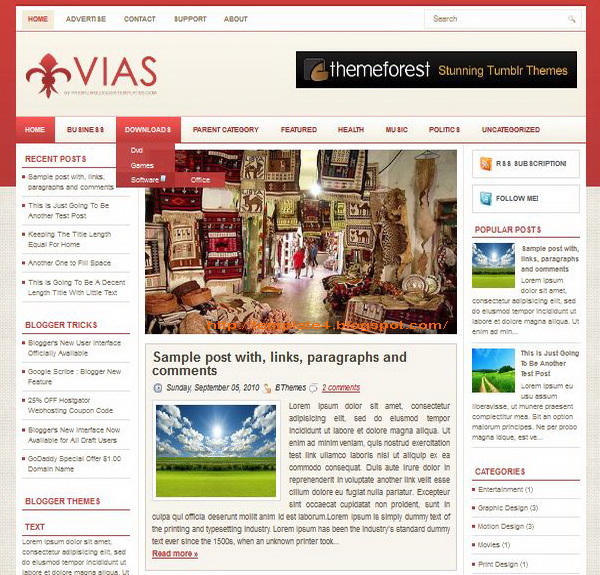
Vias Blogger Template

Vias Blogger Template


Name:Vias
Platform:Blogger / Blogspot
Coder/Designer:Lasantha Bandara / New WP Themes
Coder/Designer URL:http://www.premiumbloggertemplates.com/ , http://newwpthemes.com/
Description:Vias is a free Blogger template that is an adaptation of the Wordpress,
it's a magazine style with 2 sidebar, 3 column layout, red and white color background, featured section, fixed width, header banner ads ready, left sidebar, right sidebar, slider, Twitter ready, top navigation bar and Web 2.0.
Theme Features:-
Instructions:Configure Featured Content Slider:
Login to your blogger dashboard--> layout- -> Edit HTML. Find <!-- Featured Content Slider Started -->. Now scroll down slowly and you can see each featured slider codes between <div class='imageElement'> and </div>.

Now replace,
"This is featured post X title" with your featured post title.
"SLIDER-X-URL-HERE" with your featured post URL.
Slider description with your slider description. Slider image address with your slider image. For each featured slider.

Add a Header Logo:
You can add a header logo for this template easily in the "Page Elements" section (Blogger Default Method). Logo image size must be 220px width and 76px height.
Compatible:Mozilla FirefoxGoogle ChromeSafariOperaInternet Explorer
Tags:2 sidebar, 3 column, Adapted from Wordpress, Ads Ready, Blogger, Featured Section, Fixed Width, Left Sidebar, Magazine, Page Navigation, red, Right Sidebar, Slider, Twitter Ready, Web 2.0, White, Widget Ready

Wallbase Blogger Template

Wallbase Blogger Template
Homepage
Wallbase Blogpage
Blogpage
Wallbase Postpage
Postpage


Name:Wallbase
Platform:Blogger / Blogspot
Coder/Designer:Avinas Bhardwaj, Web 2 Feel
Coder/Designer URL:http://besttheme.net/ , http://www.web2feel.com/
Description:Wallbase Blogger Template is a fullscreen slideshow portfolio Blogger
Template and converted from WordPress theme. The template has a full screen slideshow on the homepage and a regular blog with image slideshow as the background. This template is ideal for photography websites to showcase their portfolio in style.
Theme Features:-
Instructions:-
Compatible:Mozilla FirefoxGoogle ChromeSafariOperaInternet Explorer
Tags:1 Sidebar, 2 Column, Adapted from Wordpress, black, Blogger, dark, Portfolio, Right Sidebar, Slider
© 2011 Template For Blog. WP Themes by Skatter Tech. Bloggerized by Bambang Wicaksono.
Scroll down for Next Widget
 
BLOG MENU
Go
to
Top