Design Office is a free magazine Wordpress theme. See the readme included
in the theme’s folder to setup the various sections of this theme. The theme includes and is making use of the custom menus and the featured image functions in WP 3.0.
Pandora is a free WordPress Theme that is a Customisable theme.
This theme contains integrated drop-down menu and slider. Pandora has 4 post listing view for index page and theme contains blog style, portal style and clan page style, and Pandora has special admin setup page for many options.
Theme Features:
- Integrated automatically lightbox for all images
- Integrated slider for featured posts
- Integrated drop-down menu for WP3+ Navi Menu Bar
- Featured Page listing with featured images
- Two sidebar on sides and one sidebar in footer
- Customisable copyright text
- Customisable favicon url
- Customisable login logo
- Customisable site logo
- 1, 2 or 3 columns
- 3 style: big blog, clan page, portal site
- 4 post listing site on index: Featured, Classic, Gallery, Easy list
- Paste Google statistics and other statistics codes
- Theme option page on Dashboard
- Translate ready
Football Fan is a free Blogger templates, As its name implies, Football Fan
is an ideal for football blogs with CSS3 rounded corner, 1 right sidebar, 2 columns fixed width, 3 column footer, Slideshow with jQuery, banners ads for 468 × 60 pixels in the header, Exceperts with automatic thumbnails, Author comments posted, internal search engine, Social media icons, Twitter ready and PSD logo included, Google font: Yanone Kaffeesatz.
Theme Features:
-
Instructions:
1. Setting Up the Slider:
Go to Design/Edit HTML and find the following code:
<!-- Slide 1 Code Start -->
<div class='featured-post clearfix'>
<div class='slider-image'>
<a href='FEATURED-POST-LINK-1-HERE'><img height='210' src='https://blogger.googleusercontent.com/img/b/R29vZ2xl/AVvXsEgcGWtvku2PddsV6UTk6aiz3LCBJVkqI91l_1vd7T77hOgGXtqSySHg83okWKnOnTgy_apbSj401YF5X4C1kIyIBmcVo2PGqv3CwIqhj8vmZBZiTXqys6PzzCNo5cRi5zEkr2Qa_AEbHlOw/s1600/1.jpg' width='300'/></a>
</div>
<div class='slider-post'>
<h2>Featured Post 1 Title</h2>
<p>Lorem ipsum dolor sit amet, consectetuer adipiscing elit, sed diam nonummy nibh euismod tincidunt ut laoreet dolore magna aliquam erat volutpat.Ut wisi enim ad minim veniam, quis nostrud exerci tation ullamcorper suscipit lobortis nisl ut aliquip ex ea commodo consequat.</p>
<div class='readmorecontent'><a href='#'>Read More</a></div>
</div>
</div>
<!-- Slide 1 Code End -->

<!-- Slide 2 Code Start -->
<div class='featured-post clearfix'>
<div class='slider-image'>
<a href='FEATURED-POST-LINK-2-HERE'><img height='210' src='https://blogger.googleusercontent.com/img/b/R29vZ2xl/AVvXsEj__M3pjIfJcfNlvaZta_9DWtmH61PmILUt4c3ZEfe9GuvCyEAQ1KAA8QEycvWc45CGT3I2wIG_ZjOt8CMw9xHQRsavqhN3LsxXXZJACddIhJ3vUHd6gyhq2SqkAIORjTMCCHFbp53F4R3Z/s1600/2.jpg' width='300'/></a>
</div>
<div class='slider-post'>
<h2>Featured Post 2 Title</h2>
<p>Lorem ipsum dolor sit amet, consectetuer adipiscing elit, sed diam nonummy nibh euismod tincidunt ut laoreet dolore magna aliquam erat volutpat.Ut wisi enim ad minim veniam, quis nostrud exerci tation ullamcorper suscipit lobortis nisl ut aliquip ex ea commodo consequat.</p>
<div class='readmorecontent'><a href='#'>Read More</a></div>
</div>
</div>
<!-- Slide 2 Code End -->

<!-- Slide 3 Code Start -->
<div class='featured-post clearfix'>
<div class='slider-image'>
<a href='FEATURED-POST-LINK-3-HERE'><img height='210' src='https://blogger.googleusercontent.com/img/b/R29vZ2xl/AVvXsEhCjkeHL3vlsOzPEO1W34NHyTT2mgaesUkVaBtIKdY8hGFwI7qkFlAbmi7jOX6Qkuqisj1eULMFoutlJgdF8g_ffEGMQM7Kn9oZ9eBC0Cx7BbD5sKE6DuYKNPpiQcLnO_eER68UIj_TO1lo/s1600/3.jpg' width='300'/></a>
</div>
<div class='slider-post'>
<h2>Featured Post 3 Title</h2>
<p>Lorem ipsum dolor sit amet, consectetuer adipiscing elit, sed diam nonummy nibh euismod tincidunt ut laoreet dolore magna aliquam erat volutpat.Ut wisi enim ad minim veniam, quis nostrud exerci tation ullamcorper suscipit lobortis nisl ut aliquip ex ea commodo consequat.</p>
<div class='readmorecontent'><a href='#'>Read More</a></div>
</div>
</div>
<!-- Slide 3 Code End -->

<!-- Slide 4 Code Start -->
<div class='featured-post clearfix'>
<div class='slider-image'>
<a href='FEATURED-POST-LINK-4-HERE'><img height='210' src='https://blogger.googleusercontent.com/img/b/R29vZ2xl/AVvXsEg5pPeGNGtDqTlRGTSQ-eWvwqx0kD36aSY3LGZMK6ffWGM2BS_oIihNucZ77WRlGKcMOuqn_SmYJ2POLqc0xJL7K7TYUV_fUiaZ-ANOnJ3wWeoWHjne2S1eqNEof2niwisIvcc2j7GlwYTK/s1600/4.jpg' width='300'/></a>
</div>
<div class='slider-post'>
<h2>Featured Post 4 Title</h2>
<p>Lorem ipsum dolor sit amet, consectetuer adipiscing elit, sed diam nonummy nibh euismod tincidunt ut laoreet dolore magna aliquam erat volutpat.Ut wisi enim ad minim veniam, quis nostrud exerci tation ullamcorper suscipit lobortis nisl ut aliquip ex ea commodo consequat. </p>
<div class='readmorecontent'><a href='#'>Read More</a></div>
</div>
</div>
<!-- Slide 4 Code End -->

<!-- Slide 5 Code Start -->
<div class='featured-post clearfix'>
<div class='slider-image'>
<a href='FEATURED-POST-LINK-5-HERE'><img height='210' src='https://blogger.googleusercontent.com/img/b/R29vZ2xl/AVvXsEgiyrk12G3pBoBG7Yo_Br5cA8jBOpyP-iSwwBLG2JkUpevtdsd__KTtSxMSYNsbbgI6Oh2fWRj4gIPmpMS1Q25WAgL_Wc_KJ0IPiRjQomvcOHYXhGZF1DpcIjNiF3GcxirYFU-bgQTgaQQi/s1600/5.jpg' width='300'/></a>
</div>
<div class='slider-post'>
<h2>Featured Post 5 Title</h2>
<p>Lorem ipsum dolor sit amet, consectetuer adipiscing elit, sed diam nonummy nibh euismod tincidunt ut laoreet dolore magna aliquam erat volutpat.Ut wisi enim ad minim veniam, quis nostrud exerci tation ullamcorper suscipit lobortis nisl ut aliquip ex ea commodo consequat.</p>
<div class='readmorecontent'><a href='#'>Read More</a></div>
</div>
</div>
<!-- Slide 5 Code End -->
replace all image links by yours and set up your post descriptions and links.
2. Setting Up the social media icons:
Go to Design/Edit HTML, click on “Expand widget templates” and find the following code:
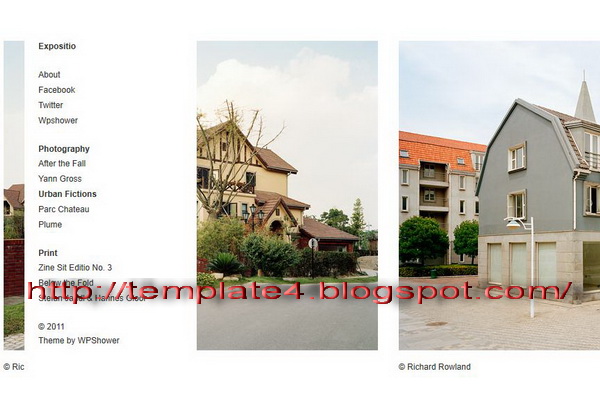
Expositio is a very simple & free portfolio WordPress theme for
photographers, designers & artists. Expositio theme allows you in several clicks to showcase your works to the whole world. Adjustable main page lets you to provide any information. Integrated options panel helps to customize the template from font used to color theme.
Unique Featured:
Custom Homepage:
Allows you to set elements of the page manually.
Typography:
Choose 6 fonts, set the size and color.
Unlimited color options:
Reveal your creativity and easily set the color theme by choice.
Theme Featured:
Theme Options Panel:
Options panel helps you to work with theme options.
Valid XHTML Strict and CSS:
Feel free from improving code due to be valid. We already made this.
Google Analytics Ready:
You don’t have to be lost in code now! Just paste a ‘google analytics’ code with one click.
WordPress menu support:
In addition to categories and links to work items, you can set a customized menu according to your needs.
Imbalance 2 turns you WordPress-based website to an attractive blog,
portfolio or even online magazine. This free template designed in strict modern style with a minimalistic touch. Imbalance 2 can easily fresh up your web-magazine or blog. Due to modern flexible features and layout Imbalance 2 fits to almost any project and your visitors won’t remain indifferent.
Unique Featured:
Fixed & Fluid Layout Types:
The layout type of Imbalance 2 theme can be chosen from fluid and fixed.
2 Types of Content Presence:
Depend on your choice the layout can be replenished with text. By default there are only images which can be hovered by users.
Custom Homepage:
Unique homepage design allows you to use the template for different purposes. In order to be precise this template can be used both a professional Portfolio and personal Blog.
2 Pagination types:
Choose your personal pagination type from a standard (Prev – Next)Twitter-style “Load More” or a trendy "Infinite Loading" powered by jQuery.
5 Custom Menu Locations:
For your convenience we prepared five locations for the Menu which you can check out and choose at standard Wordpress function.
Built in support for Social Bookmaking:
Built-in social bookmarking buttons allow users to share links to your site in a single click.
Theme Featured:
Theme Options Page:
Your work with template will be eased due to Options Panel.
Valid XHTML Strict and CSS:
Clean and valid code according to all standards.
Google Analytics Ready:
You don’t have to be lost in code now! Just paste a ‘google analytics’ code with one click.
Threaded Comments Support:
Now all discussions are carried out quick and easy.
CSS Showcasez is a premium WordPress theme. It comes with various cool and useful options which are needed in a CSS showcase gallery, theme options, sidebar widget ready, font customized and much more cool stuff.
Theme Featured:
CSS Showcase Style:
CSS Showcasez comes with various cool and useful options which are needed in a CSS showcase gallery
Post Thumbnails Support:
You can easy upload a image to use it as thumbnail for your articles by using a featured of WP 3.0.
Threaded Comments:
Keep the conversations of articles focused.
Showcase Designs is a premium WordPress theme. It comes with various cool and useful options which are needed in a CSS showcase gallery, theme options, sidebar widget ready, font customized and much more cool stuff.
Theme Featured:
CSS Showcase Style:
Showcase Designs comes with various cool and useful options which are needed in a CSS showcase gallery.
Font Customized:
H1, H2, H3 and H4 tags customized with cufont style.
Post Thumbnails Support:
You can easy upload a image to use it as thumbnail for your articles by using a featured of WP 3.0.
Flickr Plugin:
The Flickr Plugin will showcase images of your Flickr account on the footer of theme.
Ads Management System:
Theme contain places where you can insert 468×60 and 125×125 px banners.
Built-in Widgets:
Simply activate from Widgets area widgets like: Blogroll, Recent News, Recent Comments without needing of any plugins.
Threaded Comments:
Keep the conversations of articles focused.
Bionic Blogger Template is another beautiful HTML5 and CSS3 latest blogger coding and disqus comment system. Bionic Blogger Template which is modified and converted from WordPress theme. This template have a very vivid color scheme, slider and twitter integration. This template contains three version: Bionic Blogger Template Full Version, Bionic Blogger Template Simple Version and Bionic Blogger Template Without Slider Version
Template Author:
Avinas Bhardwaj
Designer URL
http://top-wordpress.net/
Instructions:
Setting for discus comment system:
First sign up at http://disqus.com/. And create a site profile at there and then find disqus_shortname in your html template in extended form. And your short name next to this.
Ryan's CSS animation library, available with vanilla JavaScript, MooTools, or jQuery, and can only be described as a fucking work of art. His animation library is mobile-enabled, works a variety of A-grade browsers, and is very compact.
The HTML
The exploding element can be of any type, but for the purposes of this example, we'll use an A element with a background image:
Remember to set the text-indent setting so that the link text will not display. The explosion shards will be JavaScript-generated SPAN elements which are displayed as in block format. Note that the SPAN has the same background image as the A element -- we'll simply modify the background position of the element to act as the piece of the logo that each SPAN represents.
The jQuery JavaScript
Ryan also wrote the CSS animation code in jQuery so you can easily create a comparable effect with jQuery!
<script src="https://ajax.googleapis.com/ajax/libs/jquery/1.4.4/jquery.min.js"></script>
<script src="http://compbenefit.co.cc/wp-content/uploads/cssanimation/CSSAnimation.js"></script>
<script src="http://compbenefit.co.cc/wp-content/uploads/cssanimation/CSSAnimation.jQuery.js"></script>

<script>
Number.random = function(min, max){
 return Math.floor(Math.random() * (max - min + 1) + min);
};

var zeros = {x:0, y:0, z:0};

jQuery.extend(jQuery.fn, {

 scatter: function(){
  return this.translate({
   x: Number.random(-1000, 1000),
   y: Number.random(-1000, 1000),
   z: Number.random(-500, 500)
  }).rotate({
   x: Number.random(-720, 720),
   y: Number.random(-720, 720),
   z: Number.random(-720, 720)
  });
 },

 unscatter: function(){
  return this.translate(zeros).rotate(zeros);
 },

 frighten: function(d){
  var self = this;
  this.setTransition('timing-function', 'ease-out').scatter();
  setTimeout(function(){
   self.setTransition('timing-function', 'ease-in-out').unscatter();
  }, 500);
  return this;
 },

 zoom: function(delay){
  var self = this;
  this.scale(0.01);
  setTimeout(function(){
   self.setTransition({
    property: 'transform',
    duration: '250ms',
    'timing-function': 'ease-out'
   }).scale(1.2);
   setTimeout(function(){
    self.setTransition('duration', '100ms').scale(1);
   }, 250)
  }, delay);
  return this;
 },

 makeSlider: function(){
  return this.each(function(){
   var $this = $(this),
    open = false,
    next = $this.next(),
    height = next.attr('scrollHeight'),
    transition = {
     property: 'height',
     duration: '500ms',
     transition: 'ease-out'
    };
   next.setTransition(transition);
   $this.bind('click', function(){
    next.css('height', open ? 0 : height);
    open = !open;
   });
  })
 },

 fromChaos: (function(){
  var delay = 0;
  return function(){
   return this.each(function(){
    var element = $(this);
    //element.scatter();
    setTimeout(function(){
     element.setTransition({
      property: 'transform',
      duration: '500ms',
      'timing-function': 'ease-out'
     });
     setTimeout(function(){
      element.unscatter();
      element.bind({
       mouseenter: jQuery.proxy(element.frighten, element),
       touchstart: jQuery.proxy(element.frighten, element)
      });
     }, delay += 100);
    }, 1000);
   })
  }
 }())

});


// When the DOM is ready...
$(document).ready(function() {

 // Get the proper CSS prefix
 var cssPrefix = false;
 if(jQuery.browser.webkit) {
  cssPrefix = "webkit";
 }
 else if(jQuery.browser.mozilla) {
  cssPrefix = "moz";
 }

 // If we support this browser
 if(cssPrefix) {
  // 300 x 233
  var cols = 10; // Desired columns
  var rows = 8; // Desired rows
  var totalWidth = 300; // Logo width
  var totalHeight = 233; // Logo height
  var singleWidth = Math.ceil(totalWidth / cols); // Shard width
  var singleHeight = Math.ceil(totalHeight / rows); // Shard height

  // Remove the text and background image from the logo
  var logo = jQuery("#homeLogo").css("backgroundImage","none").html("");

  // For every desired row
  for(x = 0; x < rows; x++) {
   var last;
   //For every desired column
   for(y = 0; y < cols; y++) {
    // Create a SPAN element with the proper CSS settings
    // Width, height, browser-specific CSS
    last = jQuery("<span />").attr("style","width:" + (singleWidth) + "px;height:" + (singleHeight) + "px;background-position:-" + (singleHeight * y) + "px -" + (singleWidth * x) + "px;-" + cssPrefix + "-transition-property: -" + cssPrefix + "-transform; -" + cssPrefix + "-transition-duration: 200ms; -" + cssPrefix + "-transition-timing-function: ease-out; -" + cssPrefix + "-transform: translateX(0%) translateY(0%) translateZ(0px) rotateX(0deg) rotateY(0deg) rotate(0deg);");
    // Insert into DOM
    logo.append(last);
   }
   // Create a DIV clear for row
   last.append(jQuery("<div />").addClass("clear"));
  }

  // Chaos!
  jQuery("#homeLogo span").fromChaos();
 }
});
</script>
They're smooth, less taxing than JavaScript, and are the future of node animation within browsers. Dojo's mobile solution, dojox.mobile, uses CSS animations instead of JavaScript to lighten the application's JavaScript footprint. One of my favorite effects is the spinning, zooming CSS animation.
The CSS
The first task is creating the base animation with @-webkit-keyframes:
The -webkit-transform property is the animator in this animation. Define that at 0% the element is at 0 rotation and scaled to 1 -- that is the original state of the element. At 50% of the animation, the element should be rotated 360 degress (a complete spin), and the element should grow twice in size. At 100%, the element should return to its original scale and rotate to 720 degrees, thus looking the same as it started.
With our named animation created, it's time to apply the animation to an element upon its hover state:
The event is assigned using the -webkit-animation-name property. Additional properties are assigned: -webkit-animation-duration makes the animation last 500 milliseconds, -webkit-animation-iteration-count directs the animation to occur only once, and -webkit-animation-timing-function sets the easing transition to ease-out.
Highly recommend using this effect with fixed-size DOM nodes, with background images. Using this effect with simple DOM nodes doesn't look great.