| Name: | Deluxury |
| Platform: | WordPress |
| Coder/Designer: | WP Theme Premium |
| Coder/Designer URL: | http://www.wpthemepremium.com/ |
| Description: | Deluxury is a professional and stylish WordPress theme. The premium |
| theme includes a variety of distinctive features, such as, auto popular posts, easy logo customization, threaded comments, valid XHTML as well as the powerful theme options panel, etc. | |
| Theme Features: | - Multi-level dropdown menus |
| - Twitter, Flickr, and Video widgets - Customizable working Contact Form - Social Network links - jQuery Image Gallery - Tested in major browsers: IE7, IE8, IE9, Firefox, Chrome, Opera, Safari - Threaded comments - jQuery enhanced - Featured categories - Homepage Sliders - Easy logo customization - Custom menu supported - Valid XHTML - Gravatar Support - Adsense ready - Auto popular posts - Fixed width - Favicon - 468 x 60 banner slot - 125 x 125 banner slots - Banner positions can be turned on/off - Google Analytics code script - Compatible with latest wordpress - Powerful Theme Options panel - Many more. | |
| Instructions: | - |
| Compatible: | ![]() ![]() ![]() ![]() ![]() |
| Tags: | 2 sidebar, 3 column, 4 Column Footer, Ads Ready, adsense ready, Custom Menu, Featured Content, Fixed Width, Grey, Magazine, Page Navigation, Premium, Right Sidebar, Slider, Social Bookmark, Tabber, Theme Options, Threaded Comments, Widget Ready, wordpress |
Showing posts with label Tabber. Show all posts
Deluxury WordPress Theme
Exalted Blogger Template
| Name: | Exalted |
| Platform: | Blogger / Blogspot |
| Coder/Designer: | Lasantha Bandara / Free WordPress Themes |
| Coder/Designer URL: | http://www.premiumbloggertemplates.com/ , http://fthemes.com/ |
| Description: | Exalted is a free Blogger template that is an adaptation of the Wordpress, |
| it's a premium elegant magazine style with 1 sidebar, 2 column, 3 column footer, orange, grey and white color background, featured section, fixed width, header ads banner, right sidebar, slider, social bookmark, Twitter ready, tabbed widget, top navigation bar and Web 2.0. | |
| Theme Features: | - |
| Instructions: | Configure Featured Content Slider: |
| Login to your blogger dashboard--> layout- -> Edit HTML. Find <!-- Featured Content Slider Started -->. Now scroll down slowly and you can see each featured slider codes between <div class='fp-post'> and </div>. Now replace, "This is default featured post X title" with your featured post title. "featured-post-X-url-here" with your featured post URL. Slider description with your slider description. Slider image address with your slider image. For each featured slider. Configure Second Navigation Menu Find <div class='menu-secondary-wrap'> inside your template. You can see like this code (partly): Change the name "Business, Internet, Market" and so on if you want. Replace "#" mark with the URL you want to go when click on the name Note : You do not need to change "Home" URL, because it is automatically linked to your homepage. Change Tab Names of Tab Widget: If you want to change your tab names of your tab widget then find this: Now change the names "Populars", "Tags" and "Blog Archives" as you like. Add a Header Logo: You can add a header logo for this template easily in the "Page Elements" section (Blogger Default Method). Logo image size must be 334px width and 58px height. | |
| Compatible: | ![]() ![]() ![]() ![]() ![]() |
| Tags: | 1 Sidebar, 2 Column, 3 column footer, Adapted from Wordpress, Ads Ready, Blogger, Elegant, Featured Section, Fixed Width, Grey, Magazine, orange, Premium, Right Sidebar, Slider, Social Bookmark, Tabber, Twitter Ready, Web 2.0, White, Widget Ready |
SuvSite Blogger Template
| Name: | SuvSite |
| Platform: | Blogger / Blogspot |
| Coder/Designer: | Lasantha Bandara / Free WordPress Themes |
| Coder/Designer URL: | http://www.premiumbloggertemplates.com/ , http://fthemes.com/ |
| Description: | SuvSite is a free Blogger template that is an adaptation of the Wordpress, |
| it's a premium elegant magazine style with 2 sidebar, 3 column, 3 column footer, blue and white color background, featured section, fixed width, header ads banner, left sidebar, page navigation, right sidebar, slider, social bookmark, Twitter ready, tabbed widget, top navigation bar and Web 2.0. | |
| Theme Features: | - |
| Instructions: | Configure Featured Content Slider: |
| Login to your blogger dashboard--> layout- -> Edit HTML. Find <!-- Featured Content Slider Started -->. Now scroll down slowly and you can see each featured slider codes between <div class='fp-post'> and </div>. Now replace, "This is default featured post X title" with your featured post title. "featured-post-X-url-here" with your featured post URL. Slider description with your slider description. Slider image address with your slider image. For each featured slider. Configure Second Navigation Menu Find <div class='menu-secondary-wrap'> inside your template. You can see like this code (partly): Change the name "Business, Internet, Market" and so on if you want. Replace "#" mark with the URL you want to go when click on the name Note : You do not need to change "Home" URL, because it is automatically linked to your homepage. Change Tab Names of Tab Widget: If you want to change your tab names of your tab widget then find this: Now change the names "Populars", "Tags" and "Blog Archives" as you like. Add a Header Logo: You can add a header logo for this template easily in the "Page Elements" section (Blogger Default Method). Logo image size must be 343px width and 64px height. | |
| Compatible: | ![]() ![]() ![]() ![]() ![]() |
| Tags: | 2 Sidebar, 3 Column, 3 column footer, Adapted from Wordpress, Ads Ready, Blue, Blogger, Elegant, Featured Section, Fixed Width, Left Sidebar, Magazine, Page Navigation, Premium, Right Sidebar, Slider, Social Bookmark, Tabber, Twitter Ready, Web 2.0, White, Widget Ready |
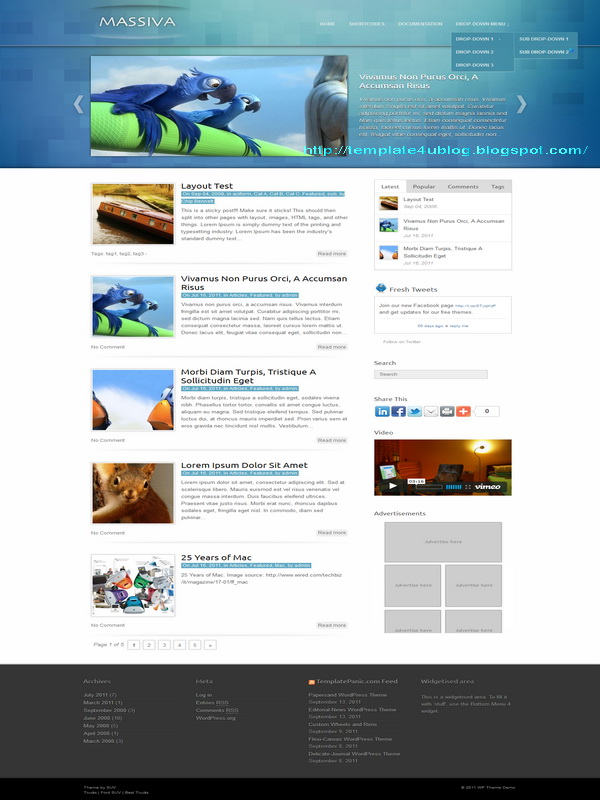
Massiva WordPress Theme
| Name: | Massiva |
| Platform: | WordPress |
| Coder/Designer: | Template Panic |
| Coder/Designer URL: | http://www.templatepanic.com/ |
| Description: | Massiva is a free beautiful theme for Wordpress, with lots of features. |
| Featuring modern jQuery Powered Sliding Gallery and theme options page. Compatible for WordPress 3.2. Documentation about how to use this theme included in the zip file. With threaded comments, 1 right sidebar, 2 columns, 4 column footer, ads ready, blue and white color background, featured content, fixed width, magazine style, page navigation, social bookmark, tabbed widget, Twitter ready and more. | |
| Theme Features: | - |
| Instructions: | Please read this article for more information about how to use this theme: |
| http://wpdemo.templatepanic.com/installing-and-setting-up-the-wordpress-theme | |
| Compatible: | ![]() ![]() ![]() ![]() ![]() |
| Tags: | 1 Sidebar, 2 Column, 4 Column Footer, Ads Ready, Blue, Featured Content, Fixed Width, Magazine, Page Navigation, Right Sidebar, Slider, Social Bookmark, Tabber, Theme Options, Threaded Comments, Twitter Ready, White, Widget Ready, wordpress |
TechNet WordPress Theme
| Name: | TechNet |
| Platform: | WordPress |
| Coder/Designer: | FThemes |
| Coder/Designer URL: | http://fthemes.com/ |
| Description: | TechNet is a free news WordPress theme with featured content option and |
| options page. Supports post thumbnails. Suitable for any niche, especially fashion design sites. | |
| Theme Features: | Options Page |
| Post Thumbnails Featured Content 125×125 banners ready (easy editable from admin options) 468×60 Header Banner ready (easy editable from admin options) Three columns Gravatar on Comments Compatible with latest WordPress versions Widgets Ready SEO Optimized Fixed width Logo .PSD file and font files are included in theme folder. Tested and compatible with all major browsers: IE, FF, Safari | |
| Instructions: | - |
| Compatible: | ![]() ![]() ![]() |
| Tags: | 2 sidebar, 3 column, Ads Ready, Blue, Elegant, Featured Content, Fixed Width, Grey, Magazine, News, Page Navigation, Right Sidebar, SEO Optimized, Slider, Social Bookmark, Tabber, Theme Options, Threaded Comments, Twitter Ready, White, Widget Ready, wordpress |
TechNet Blogger Template
| Name: | TechNet |
| Platform: | Blogger / Blogspot |
| Coder/Designer: | Lasantha Bandara / Free WordPress Themes |
| Coder/Designer URL: | http://www.premiumbloggertemplates.com/ , http://fthemes.com/ |
| Description: | TechNet is a free Blogger template that is an adaptation of the Wordpress, |
| it's a premium elegant magazine style with 2 sidebar, 3 column, 3 column footer, black, blue, grey and white color background, featured section, fixed width, header ads banner, page navigation, right sidebar, slider, social bookmark, twitter ready, tabbed widget, top navigation bar and Web 2.0. | |
| Theme Features: | - |
| Instructions: | Configure Featured Content Slider: |
| Login to your blogger dashboard--> layout- -> Edit HTML. Find <!-- Featured Content Slider Started -->. Now scroll down slowly and you can see each featured slider codes between <div class='fp-post'> and </div>. Now replace, "This is default featured post X title" with your featured post title. "featured-post-X-url-here" with your featured post URL. Slider description with your slider description. Slider image address with your slider image. For each featured slider. Configure Second Navigation Menu Find <div class='menu-secondary-wrap'> inside your template. You can see like this code (partly): Change the name "Business, Internet, Market" and so on if you want. Replace "#" mark with the URL you want to go when click on the name Note : You do not need to change "Home" URL, because it is automatically linked to your homepage. Change Tab Names of Tab Widget: If you want to change your tab names of your tab widget then find this: Now change the names "Populars", "Tags" and "Blog Archives" as you like. Add a Header Logo: You can add a header logo for this template easily in the "Page Elements" section (Blogger Default Method). Logo image size must be 359px width and 62px height. | |
| Compatible: | ![]() ![]() ![]() ![]() ![]() |
| Tags: | 2 Sidebar, 3 Column, 3 column footer, Adapted from Wordpress, Ads Ready, Blue, Blogger, Elegant, Featured Section, Fixed Width, Grey, Magazine, Page Navigation, Premium, Right Sidebar, Slider, Social Bookmark, Tabber, Twitter Ready, Web 2.0, White, Widget Ready |
Emboss Blogger Template
| Name: | Emboss |
| Platform: | Blogger / Blogspot |
| Coder/Designer: | Lasantha Bandara / Free WordPress Themes |
| Coder/Designer URL: | http://www.premiumbloggertemplates.com/ , http://fthemes.com/ |
| Description: | Emboss is a free Blogger template that is an adaptation of the Wordpress, |
| it's a premium elegant magazine style with 1 sidebar, 2 column, 3 column footer, black, grey and white color background, featured section, fixed width, header ads banner, page navigation, right sidebar, slider, social bookmark, twitter ready, tabbed widget, top navigation bar and Web 2.0. | |
| Theme Features: | - |
| Instructions: | Configure Featured Content Slider: |
| Login to your blogger dashboard--> layout- -> Edit HTML. Find <!-- Featured Content Slider Started -->. Now scroll down slowly and you can see each featured slider codes between <div class='fp-post'> and </div>. Now replace, "This is default featured post X title" with your featured post title. "featured-post-X-url-here" with your featured post URL. Slider description with your slider description. Slider image address with your slider image. For each featured slider. Configure Second Navigation Menu Find <div class='menu-secondary-wrap'> inside your template. You can see like this code (partly): Change the name "Business, Internet, Market" and so on if you want. Replace "#" mark with the URL you want to go when click on the name Note : You do not need to change "Home" URL, because it is automatically linked to your homepage. Change Tab Names of Tab Widget: If you want to change your tab names of your tab widget then find this: Now change the names "Populars", "Tags" and "Blog Archives" as you like. Add a Header Logo: You can add a header logo for this template easily in the "Page Elements" section (Blogger Default Method). Logo image size must be 335px width and 70px height. | |
| Compatible: | ![]() ![]() ![]() ![]() ![]() |
| Tags: | 1 Sidebar, 2 Column, 3 column footer, Adapted from Wordpress, Ads Ready, black, Blogger, Elegant, Featured Section, Fixed Width, Grey, Magazine, Page Navigation, Premium, Right Sidebar, Slider, Social Bookmark, Tabber, Twitter Ready, Web 2.0, White, Widget Ready |
Limex Blogger Template
| Name: | Limex |
| Platform: | Blogger / Blogspot |
| Coder/Designer: | Lasantha Bandara / Free WordPress Themes |
| Coder/Designer URL: | http://www.premiumbloggertemplates.com/ , http://fthemes.com/ |
| Description: | Limex is a free Blogger template that is an adaptation of the Wordpress, |
| it's a premium elegant magazine style with 2 sidebar, 3 column, 3 column footer, grey, orange and white color background, featured section, fixed width, header ads banner, page navigation, right sidebar, slider, social bookmark, twitter ready, tabbed widget, top navigation bar and Web 2.0. | |
| Theme Features: | - |
| Instructions: | Configure Featured Content Slider: |
| Login to your blogger dashboard--> layout- -> Edit HTML. Find <!-- Featured Content Slider Started -->. Now scroll down slowly and you can see each featured slider codes between <div class='fp-post'> and </div>. Now replace, "This is default featured post X title" with your featured post title. "featured-post-X-url-here" with your featured post URL. Slider description with your slider description. Slider image address with your slider image. For each featured slider. Configure Second Navigation Menu Find <div class='menu-secondary-wrap'> inside your template. You can see like this code (partly): Change the name "Business, Internet, Market" and so on if you want. Replace "#" mark with the URL you want to go when click on the name Note : You do not need to change "Home" URL, because it is automatically linked to your homepage. Change Tab Names of Tab Widget: If you want to change your tab names of your tab widget then find this: Now change the names "Populars", "Tags" and "Blog Archives" as you like. Add a Header Logo: You can add a header logo for this template easily in the "Page Elements" section (Blogger Default Method). Logo image size must be 294px width and 56px height. | |
| Compatible: | ![]() ![]() ![]() ![]() ![]() |
| Tags: | 2 sidebar, 3 column, 3 column footer, Adapted from Wordpress, Ads Ready, Blogger, Elegant, Featured Section, Fixed Width, Grey, Magazine, orange, Page Navigation, Premium, Right Sidebar, Slider, Social Bookmark, Tabber, Twitter Ready, Web 2.0, White, Widget Ready |
Limex WordPress Theme
| Name: | Limex |
| Platform: | WordPress |
| Coder/Designer: | FThemes |
| Coder/Designer URL: | http://fthemes.com/ |
| Description: | Limex is a free news WordPress theme with featured content option and |
| options page. Supports post thumbnails. Suitable for any niche, especially fashion design sites. | |
| Theme Features: | Options Page |
| Post Thumbnails Featured Content 125×125 banners ready (easy editable from admin options) 468×60 Header Banner ready (easy editable from admin options) Three columns Gravatar on Comments Compatible with latest WordPress versions Widgets Ready SEO Optimized Fixed width Logo .PSD file and font files are included in theme folder. Tested and compatible with all major browsers: IE, FF, Safari | |
| Instructions: | - |
| Compatible: | ![]() ![]() ![]() |
| Tags: | 2 sidebar, 3 column, Ads Ready, Elegant, Featured Content, Fixed Width, Grey, Magazine, News, orange, Page Navigation, Right Sidebar, SEO Optimized, Slider, Social Bookmark, Tabber, Theme Options, Threaded Comments, Twitter Ready, Widget Ready, wordpress |
Recent Posts
Recent Comments
Popular Posts
Sponsors
Visitors
Scroll down for Next Widget